
Home › Models › BYD DOLPHIN › Troubleshooting › DiLink Touchscreen & Infotainment
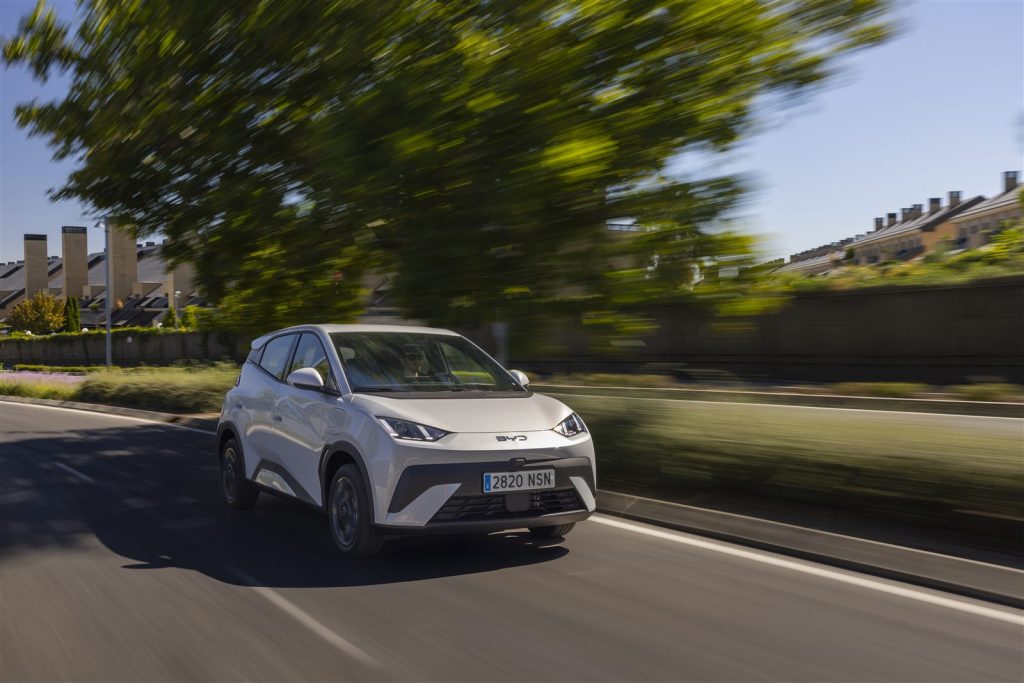
This page covers the DiLink infotainment system fitted to the BYD DOLPHIN hatchback — a pure electric vehicle sold in Australia. Topics include the 12.8-inch intelligent rotating touchscreen, DiLink software, over-the-air (OTA) firmware updates, Apple CarPlay and Android Auto connectivity, audio output, the wireless charging pad on Premium variants, the BYD app and digital key, and what to do when the screen freezes or becomes unresponsive.
This is an independent, unofficial guide compiled from publicly available BYD Australia materials. Trim names, specifications and features reflect a compiled dataset from October 2026; BYD Automotive Australia may update variants at any time. Every detail should be confirmed with an authorised BYD dealer or the official BYD Australia website.
Contents
- The DiLink Rotating Touchscreen
- DiLink Software & OTA Firmware Updates
- Apple CarPlay, Android Auto & Connectivity
- Audio System
- Wireless Charging & V2L Function
- BYD App & Digital Key
- Screen Freezes & Resets
- Frequently Asked Questions
- See Also
- Sources
The DiLink Rotating Touchscreen
The BYD DOLPHIN is fitted with a 12.8-inch intelligent rotating touchscreen that serves as the central control interface for climate, media, navigation, vehicle settings and connected services. The screen is described in BYD’s official materials as an intelligent rotating display; for details on available orientations and the functions accessible in each mode, refer to the official owner’s manual.
Touch response, brightness and display preferences can be adjusted within the settings menu on the screen itself. If display behaviour changes unexpectedly — such as reduced brightness, unresponsive touch zones, or unexpected rotation behaviour — refer to the official owner’s manual for the relevant adjustment procedure before assuming a hardware fault. For persistent display problems that cannot be resolved through the settings menu, consult an authorised BYD dealer.
DiLink Software & OTA Firmware Updates
The BYD DOLPHIN DiLink infotainment system supports over-the-air (OTA) updates, which allow BYD Automotive Australia to deliver software improvements and feature additions without requiring a dealer visit. Premium variant owners receive 2 GB of complimentary mobile data per month for the first 2 years, which can support OTA download processes; Essential variant owners should confirm their connectivity options with an authorised BYD dealer.
When a DiLink software update becomes available, a notification appears on the touchscreen. The update process and any prerequisites — such as ensuring the vehicle is plugged in or has sufficient charge — are detailed in the official owner’s manual. It is advisable not to interrupt an in-progress update. If an update appears to stall or the system does not reflect the expected software version after completion, confirm with BYD Automotive Australia or an authorised dealer whether the update completed successfully.
Unauthorised software modifications or third-party firmware installations are not supported and may void the vehicle warranty. Refer to BYD’s warranty terms at bydautomotive.com.au/service-and-warranty for details.
Apple CarPlay, Android Auto & Connectivity
Both Apple CarPlay and Android Auto are supported on the BYD DOLPHIN as standard across Essential and Premium variants. These systems project a compatible smartphone’s interface onto the DiLink touchscreen, enabling navigation, calls, messages and compatible apps.
Connection is established either via a USB cable or, depending on the phone and software version, wirelessly. If CarPlay or Android Auto fails to connect or drops out during use, the following steps may help:
- Check that the USB cable is undamaged and fully seated (for wired connections).
- Restart the smartphone and attempt to reconnect.
- Ensure the phone’s software is up to date.
- Confirm that CarPlay or Android Auto is enabled in the phone’s settings.
If the issue persists after these checks, the DiLink system’s connectivity settings may need review — refer to the official owner’s manual for the pairing and connection procedure. For problems that cannot be resolved through standard troubleshooting, consult an authorised BYD dealer.
Audio System
The BYD DOLPHIN is fitted with a 6-speaker sound system supporting DAB digital radio and FM radio reception, as well as audio playback through connected devices via Apple CarPlay, Android Auto, Bluetooth or USB media. Audio source and volume controls are accessible through the DiLink touchscreen; refer to the official owner’s manual for guidance on the full range of available settings.
DAB reception quality depends on local digital radio coverage. If DAB reception is weak or unavailable in a particular area, the system can be switched to FM. Audio output faults — such as distortion, no sound from one or more speakers, or complete loss of audio — that cannot be resolved by adjusting settings within the DiLink menu should be assessed by an authorised BYD dealer, as speaker or amplifier diagnostics require workshop access to the vehicle’s electrical system.
Wireless Charging & V2L Function
Wireless phone charging: The Premium variant of the BYD DOLPHIN includes a mobile phone wireless charging pad in the centre console. If the pad becomes warm during use, this is a characteristic of wireless charging technology. If the charging pad stops functioning or becomes excessively warm, remove the device and allow the pad to cool before retrying. Check that the device is compatible with the wireless charging standard supported by the vehicle. If the issue continues, consult an authorised BYD dealer rather than attempting any disassembly.
V2L (Vehicle-to-Load): Both the Essential and Premium variants of the BYD DOLPHIN include a V2L (Vehicle-to-Load) function, accessible using the V2L discharge adapter. This allows owners to power external devices and appliances — such as portable camping equipment — directly from the vehicle’s traction battery. The V2L system’s output capacity and compatible adapter specifications are subject to manufacturer specifications; refer to the official owner’s manual for connection procedures and any restrictions on device wattage or duration of use.
Any concern with V2L hardware, the charging port, or the high-voltage electrical system must be directed to an authorised BYD dealer or qualified technician. Owners must not attempt to open, modify or tamper with high-voltage vehicle components.
BYD App & Digital Key
The BYD DOLPHIN supports the BYD digital key function, which allows a compatible smartphone to act as a vehicle access key. The BYD app provides remote access to vehicle information and certain vehicle controls from a connected device. Configuration of the digital key and app pairing is described in the official owner’s manual.
If the BYD digital key becomes unresponsive or the app loses connection to the vehicle, basic steps include checking the smartphone’s Bluetooth and internet connection, ensuring the BYD app is updated to the current version, and restarting both the app and the smartphone. For account-related issues or persistent connectivity problems, contact BYD Automotive Australia’s Customer Care Centre on 1800 888 293 (Monday to Friday, 9:30 am to 5:30 pm AEST) or email bydservice.au@byd.com. For hardware-level key fob or NFC issues, consult an authorised BYD dealer.
Screen Freezes & Resets
If the DiLink touchscreen becomes unresponsive, displays a blank screen or behaves erratically, a soft reset of the infotainment system is the first step. The procedure for performing a soft reset without affecting vehicle operation is described in the official owner’s manual. In many cases, this resolves transient software issues without requiring dealer intervention.
If the screen returns to normal operation after a reset but the issue recurs, note the conditions under which it occurs (for example, during OTA updates, after connecting a particular device, or at specific ambient temperatures) and report these to an authorised BYD dealer. This information assists technicians in diagnosing whether the root cause is software-related — potentially addressable through a DiLink system update — or requires hardware assessment.
For a screen that remains blank or unresponsive after a soft reset, do not attempt to access or open any wiring behind the dashboard. Confirm with BYD Automotive Australia or consult an authorised BYD dealer for a workshop diagnosis.
Frequently Asked Questions
Does the BYD DOLPHIN support wireless Apple CarPlay or Android Auto?
Wireless connectivity for Apple CarPlay and Android Auto depends on the phone model and software version. Wired USB connection is supported. Confirm the wireless capability of a specific phone model with an authorised BYD dealer or by consulting the official owner’s manual for compatibility details.
How do DiLink OTA software updates work on the BYD DOLPHIN?
Over-the-air updates are delivered through the vehicle’s internet connection. Premium variant owners receive 2 GB of complimentary data per month for the first 2 years to support this. When an update is available, a notification appears on the DiLink touchscreen. Refer to the official owner’s manual for the step-by-step update procedure.
What should be done if the DiLink touchscreen freezes or goes blank?
The first step is to perform a soft reset as described in the official owner’s manual. If the screen remains unresponsive or the problem recurs after resetting, consult an authorised BYD dealer for a diagnostic assessment.
Can the BYD DOLPHIN’s V2L function power camping appliances?
The V2L function, available on both Essential and Premium variants via the V2L discharge adapter, can supply power to external devices including portable appliances. The types and wattage of devices that can be supported are subject to manufacturer specifications — refer to the official owner’s manual for guidance on compatible loads and safe operating procedures.
Does the BYD DOLPHIN Premium have a wireless phone charging pad?
Yes. The wireless phone charging pad is a feature of the Premium variant. If it becomes warm or stops charging, check device compatibility and allow the pad to cool before retrying. Persistent issues should be assessed by an authorised BYD dealer.
Is the BYD DOLPHIN’s ANCAP safety rating publicly available?
The official BYD Australia model page displays the ANCAP logo. For the current star rating, check ancap.com.au directly, as ratings may be updated.
See Also
- BYD DOLPHIN Review & Overview
- BYD DOLPHIN Warranty & Documentation
- BYD DOLPHIN Battery & Charging System
- BYD DOLPHIN Electric Drive Unit
- BYD DOLPHIN 12V Auxiliary Electrical System
- BYD DOLPHIN DiPilot Driver Assistance Systems
- BYD DOLPHIN Troubleshooting & Issues Hub
Sources
- https://bydautomotive.com.au/dolphin
- https://bydautomotive.com.au/brochures/BYD-DOLPHIN-2025.pdf
- https://bydautomotive.com.au/service-and-warranty
- https://bydautomotive.com.au/contact-us
Disclaimer: This guide is for informational purposes only. Official specifications, recall details, and warranty terms are determined by BYD Automotive Australia (EVDirect). Always consult an authorized dealer or official owner’s manual.